Video Player
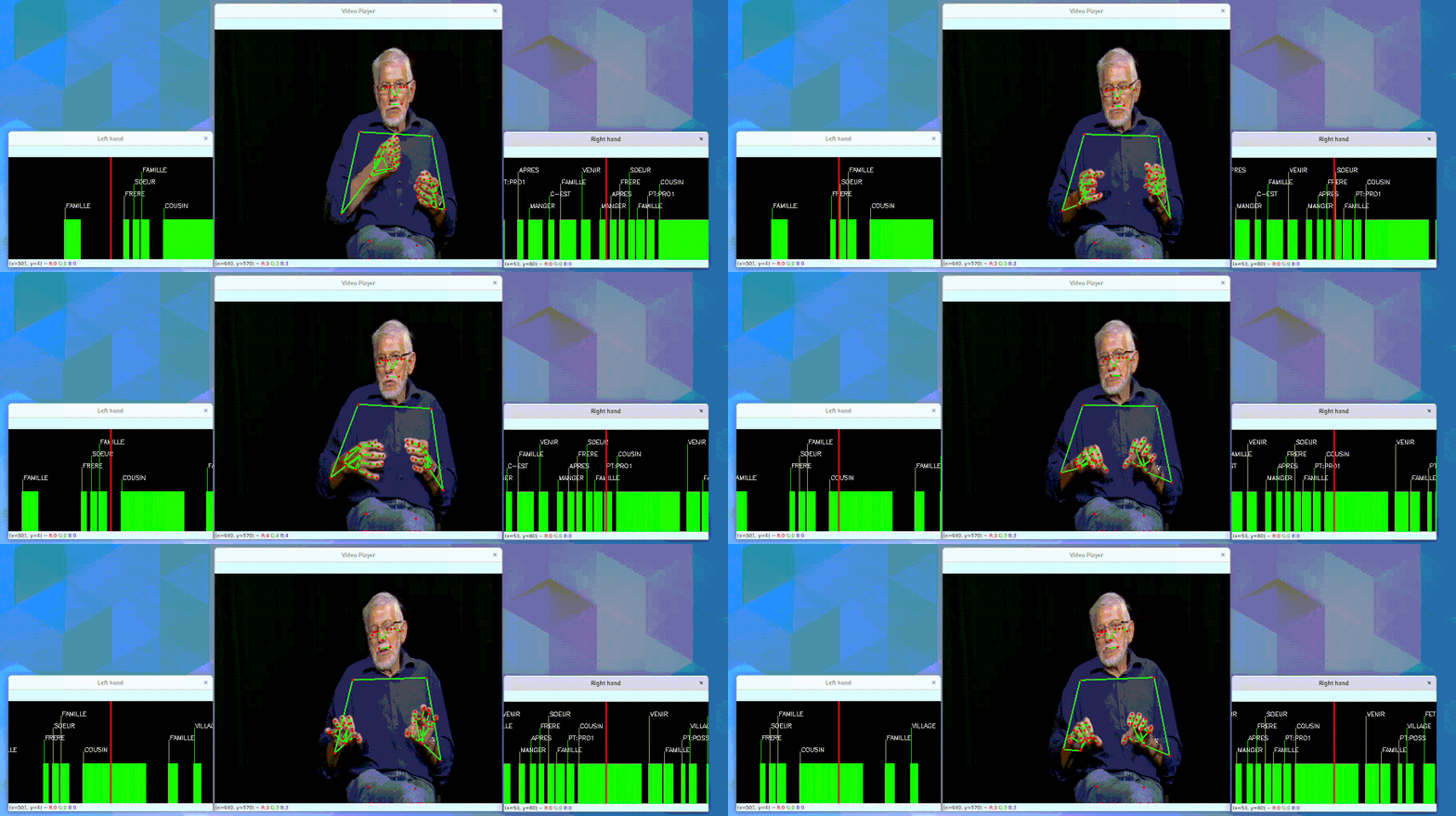
VideoPlayer is an OpenCV-based, modular player for visualizing sign language recordings: a video
(or an empty canvas), pose skeletons, annotation timelines, time series or heatmaps, all synchronized
on a single playback clock.
Components are attached to the player as a forest: each root component (e.g. a video, or an empty
canvas) opens its own window, and children (e.g. skeletons overlaid on a video, or a time series
drawn inside an info panel) render into their parent's frame via parent_name.
Example
Overlay pose skeletons on an empty canvas — the typical way to visualize pose-only samples such as
the ones loaded via sign-language-data-loading:
import numpy as np
from sign_language_tools.player import VideoPlayer
from sign_language_tools.pose.mediapipe.edges import UPPER_POSE_EDGES, HAND_EDGES

pose = np.load("examples/ressources/pose.npy")
left_hand = np.load("examples/ressources/left_hand.npy")
right_hand = np.load("examples/ressources/right_hand.npy")

player = VideoPlayer()
player.attach_empty(width=800, height=600, name="pose data")
player.attach_poses(pose, UPPER_POSE_EDGES, parent_name="pose data")
player.attach_poses(left_hand, HAND_EDGES, edge_color=(255, 0, 0), parent_name="pose data")
player.attach_poses(right_hand, HAND_EDGES, edge_color=(0, 0, 255), parent_name="pose data")

player.play(speed=0.5)
Or play a video file directly, overlaying its annotation segments:
from sign_language_tools.player import VideoPlayer

player = VideoPlayer()
player.attach_video_file("video.mp4", name="video")
player.attach_segments(
    segments,          # (M, 2) or (M, 3) array of [start, end(, label)]
    unit="s",
    labels=["bonjour", "merci"],
    parent_name="video",
)
player.play()
Controls
Once play() is running, the following keys control playback:
| Key | Action |
|---|---|
Space |
Pause / resume |
→ |
Seek forward (10s by default) |
← |
Seek backward (10s by default) |
q |
Quit |
Reference
sign_language_tools.player.player.VideoPlayer 
VideoPlayer(
    default_fps: float = 24,
    default_size: tuple[int, int] = (800, 600),
)
Modular video player for sign-language visualisation.
Components are arranged in a forest (list of trees). Root-level components each get their own OpenCV window; children render into their parent's frame.
Seeking model — the player maintains a single global clock.
Every component receives the current time t and renders the frame
at that instant. Because VideoComponent now uses random-access
decoding (via decord or OpenCV set(POS_FRAMES)), seeking is just
changing t — no stream reset needed.
attach_heatmap 
attach_heatmap(
    values: ndarray,
    name: str | None = None,
    parent_name: str | None = None,
    fps: float | None = None,
    speed: float = 1.0,
    x_lim: tuple[int, int] = (0, 300),
    y_lim: tuple[int, int] = (0, 200),
    value_range: tuple[float, float] | None = None,
    colormap: int = cv2.COLORMAP_VIRIDIS,
    ticks_color: tuple[int, int, int] = (255, 255, 255),
    background_color: tuple[int, int, int] = (0, 0, 0),
    show_timeline: bool = True,
    show_freq_axis: bool = False,
    freq_lim: tuple[float, float] | None = None,
    freq_label: str = "",
) -> HeatmapComponent
Attach a 2-D heatmap (e.g. mel spectrogram) to the player.
Parameters:
| Name | Type | Description | Default |
|---|---|---|---|
values
|
ndarray
|
|
required |
name
|
str | None
|
Component name. Auto-generated if None. |
None
|
parent_name
|
str | None
|
Parent component, or None for a top-level window. |
None
|
fps
|
float | None
|
Sample rate along the time axis. Defaults to the player's
|
None
|
speed
|
float
|
Speed multiplier (kept for API symmetry). |
1.0
|
x_lim
|
tuple[int, int]
|
Horizontal pixel region inside the host window/parent. |
(0, 300)
|
y_lim
|
tuple[int, int]
|
Vertical pixel region inside the host window/parent. |
(0, 200)
|
value_range
|
tuple[float, float] | None
|
|
None
|
colormap
|
int
|
OpenCV colormap constant. |
COLORMAP_VIRIDIS
|
ticks_color
|
tuple[int, int, int]
|
Colour for the time cursor / ticks. |
(255, 255, 255)
|
background_color
|
tuple[int, int, int]
|
Region fill before drawing. |
(0, 0, 0)
|
show_timeline
|
bool
|
Whether to draw the cursor and ±1 s ticks. |
True
|
show_freq_axis
|
bool
|
If True, write small axis labels on the left. |
False
|
freq_lim
|
tuple[float, float] | None
|
|
None
|
freq_label
|
str
|
Unit string (e.g. |
''
|
Example::
player.attach_heatmap(
    mel_spec,                    # shape (T, n_mels), e.g. (1000, 80)
    parent_name="info_panel",
    x_lim=(0, 800), y_lim=(130, 250),
    value_range=(-1.0, 1.0),
    show_freq_axis=True,
    freq_lim=(0, 8000),
    freq_label="Hz",
)
attach_time_series 
attach_time_series(
    values: ndarray,
    name: str | None = None,
    parent_name: str | None = None,
    fps: float | None = None,
    speed: float = 1.0,
    x_lim: tuple[int, int] = (0, 300),
    y_lim: tuple[int, int] = (0, 200),
    value_range: tuple[float, float] = (0.0, 1.0),
    channel_labels: list[str] | None = None,
    channel_colors: (
        list[tuple[int, int, int]] | None
    ) = None,
    line_width: int = 1,
    ticks_color: tuple[int, int, int] = (255, 255, 255),
    background_color: tuple[int, int, int] | None = None,
    show_timeline: bool = True,
    show_legend: bool = True,
) -> TimeSeriesComponent
Attach a 1-D time series (or multi-channel one) to the player.
Parameters:
| Name | Type | Description | Default |
|---|---|---|---|
values
|
ndarray
|
Either a (T,) array or a (T, C) array of sample values. |
required |
name
|
str | None
|
Component name. Auto-generated if None. |
None
|
parent_name
|
str | None
|
If given, the time-series is drawn into this component's frame; otherwise it becomes its own window. |
None
|
fps
|
float | None
|
Sampling rate of values. Defaults to the player's
|
None
|
speed
|
float
|
Speed multiplier (kept for API symmetry; the drawing itself is driven by the global clock). |
1.0
|
x_lim
|
tuple[int, int]
|
Horizontal pixel region inside the host window/parent. |
(0, 300)
|
y_lim
|
tuple[int, int]
|
Vertical pixel region inside the host window/parent. |
(0, 200)
|
value_range
|
tuple[float, float]
|
|
(0.0, 1.0)
|
channel_labels
|
list[str] | None
|
Optional legend labels (one per channel). |
None
|
channel_colors
|
list[tuple[int, int, int]] | None
|
Optional BGR colours (one per channel; cycled). |
None
|
line_width
|
int
|
Polyline thickness. |
1
|
ticks_color
|
tuple[int, int, int]
|
Colour for the time cursor / ticks. |
(255, 255, 255)
|
background_color
|
tuple[int, int, int] | None
|
If set, fill the panel before drawing. |
None
|
show_timeline
|
bool
|
Whether to draw the cursor and ±1 s ticks. |
True
|
show_legend
|
bool
|
Whether to draw the channel legend. |
True
|
Example::
# Per-frame sign probability from a classifier
player.attach_time_series(
    probs,                         # shape (T,) or (T, C)
    parent_name="info_panel",
    x_lim=(0, 800), y_lim=(0, 120),
    value_range=(0.0, 1.0),
    channel_labels=["P(sign)"],
)
attach_video_tensor 
attach_video_tensor(
    frames: ndarray,
    fps: float = 25.0,
    name: str | None = None,
    speed: float = 1.0,
    start_ms: int | None = None,
    is_rgb: bool = True,
) -> VideoComponent
Attach an in-memory video tensor (numpy array or PyTorch tensor).
Parameters:
| Name | Type | Description | Default |
|---|---|---|---|
frames
|
ndarray
|
Array-like with shape |
required |
fps
|
float
|
Playback frame rate. |
25.0
|
name
|
str | None
|
Display name. |
None
|
speed
|
float
|
Speed multiplier. |
1.0
|
start_ms
|
int | None
|
Start offset in ms. |
None
|
is_rgb
|
bool
|
True if channels are RGB (PyTorch default), False for BGR. |
True
|
Example::
player.attach_tensor(model_output, fps=25, name="generated")
play 
play(
    speed: float = 1.0,
    start_t: float = 0.0,
    seek_step: float = _SEEK_STEP_S,
) -> None
Run the main playback loop.
Parameters:
| Name | Type | Description | Default |
|---|---|---|---|
speed
|
float
|
Global speed multiplier. |
1.0
|
start_t
|
float
|
Initial playback time in seconds. |
0.0
|
seek_step
|
float
|
Seconds to jump per arrow-key press (default 10). |
_SEEK_STEP_S
|
Controls
q — quit Space — pause / resume → arrow — seek forward seek_step seconds ← arrow — seek backward seek_step seconds
seek 
seek(t: float) -> None
Jump to absolute time t seconds.
Works both during playback and before play() (sets the start
position).
seek_delta 
seek_delta(delta_s: float) -> None
Jump forward (positive) or backward (negative) by delta_s.
sign_language_tools.player.player.PlaybackClock
dataclass

PlaybackClock(
    speed: float = 1.0,
    paused: bool = False,
    _current_t: float = 0.0,
    _last_wall: float = time(),
)
Tracks the current playback time.
The clock advances in real-time (scaled by speed) while unpaused,
and can be jumped to any position via seek().